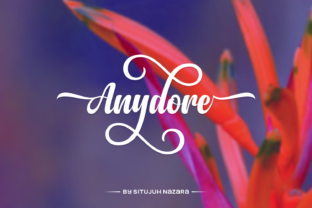
Anydore: A Handwritten Script Font That Elevates Real Small Business Branding
Last Tuesday, I sat at my kitchen table—coffee cooling beside me—staring at a stack of printed candle labels for my friend Maya’s small-batch soy candle business. She’d just relaunched with new scents and wanted packaging that felt warm, intentional, and unmistakably *hers*. The old labels used a free script font that looked charming at first glance—but under bright light or on matte kraft paper? It blurred. Letters bled together. Customers squinted at the scent names. That’s when I reached for Anydore.
A Font That Feels Human—But Holds Up Like a Pro
Anydore is a premium handwritten script font designed by Situjuh Nazara—and it’s built for real-world use. Not just “pretty on screen,” but dependable across materials: embossed on kraft tags, crisp on glossy product stickers, legible at 10pt on a tiny thank-you card, and striking at 60pt in an Instagram story banner. Its strength lies in its balance: fluid and expressive like a confident pen stroke, yet structured enough to avoid visual noise.
What sets Anydore apart isn’t just its elegance—it’s the thought behind the details. It comes packed with lots of alternate characters: swash capitals, contextual ligatures, and stylistic variants that let you subtly shift tone without switching fonts. One version of “Honey Lavender” might lean romantic (with a looping ‘y’), another grounded and earthy (using a simplified ‘v’). That flexibility means your brand voice stays consistent—even when your design needs to adapt.
Where Anydore Shines in Everyday Business Materials
I’ve tested Anydore across six common small business touchpoints—and each time, it added polish without pretension:
- Product labels & jars: On a frosted glass candle vessel, Anydore’s thick-thin contrast gives instant hierarchy—“Sage & Smoke” reads clearly even in low-lit boutique shelves.
- Packaging boxes & bags: Paired with a clean sans serif (like Montserrat or Inter) for ingredients or care instructions, Anydore becomes the friendly face of the brand—not shouting, just welcoming.
- Menus & café boards: At a neighborhood coffee shop, using Anydore for drink names (“Oat Milk Cardamom Latte”) adds warmth without sacrificing scannability—especially when sized 18–24pt on laminated menus.
- Thank-you cards & stickers: Its natural rhythm makes handwritten-style messages feel personal, not generic. No more “hand-lettered” fonts that look stiff or overly scripted.
- Social media graphics: On Instagram or Pinterest, Anydore scales beautifully—even in thumbnail size. Its generous x-height and open counters keep letters distinct, even on mobile screens.
- Logo lockups & shop banners: As a display font, it works best for short, impactful words: a boutique name, a product line title, or a tagline like “Made With Care.” It’s not meant for body text—but that’s exactly why it excels as a focal point.
Typography That Builds Trust—Without Saying a Word
Here’s something few small business owners consider: typography is often the first non-verbal handshake with a customer. A shaky, uneven script can unintentionally signal “still figuring it out.” A too-perfect, robotic font may feel cold or distant. Anydore lands in the sweet spot—it feels human, practiced, and sincere. That subtle confidence translates into perceived reliability.
When Maya updated her candle labels with Anydore, she didn’t just change type. She changed how customers *felt* holding the jar—the letterforms invited pause, attention, appreciation. That’s not magic. It’s thoughtful typography doing quiet, consistent work for brand identity.
Smart Pairing & Practical Tips for Non-Designers
You don’t need design training to use Anydore well. Start simple:
- Pair it with one clean sans serif. Think: Anydore for your brand name or product title, and a neutral font like Poppins or Lato for descriptions, prices, or fine print. This creates instant visual rhythm and readability.
- Use alternates intentionally—not randomly. Pick one swash style and stick with it across all labels or social posts. Consistency > variety when building recognition.
- Check file formats before printing. Anydore comes in OTF and TTF—both widely supported. Make sure your design tool (Canva, Illustrator, or even Cricut Design Space) can access the full character set, including alternates and ligatures.
- Test readability early. Print a label at actual size. View it on your phone. Hold it under store lighting. If “Vanilla Bean” looks muddy or cramped, bump up tracking or choose a slightly simpler alternate.
- Verify commercial licensing. Anydore is a commercial font—meaning it’s cleared for use on physical products, digital templates, client work, and resale items. Just double-check the license covers your specific use case (e.g., selling branded Canva templates or embroidering tags).
It’s also worth noting: Anydore is a single-weight script font—so it’s not meant to replace your entire type system. It’s the signature flourish, the memorable accent, the handwritten soul in your otherwise structured brand. That focus is its superpower.
If you’re refreshing packaging, updating your online shop banners, or designing your first set of product stickers—Anydore won’t overcomplicate things. It won’t demand hours of kerning or manual adjustments. It simply arrives ready: elegant, versatile, and quietly professional. And in the daily hustle of running a small business, that kind of reliability is rare—and deeply valuable.